

Automatic savings transfers are pre-scheduled movements of money from your checking account to a savings account, and they are the most reliable method for building consistent savings without relying on willpower. The role of automatic savings transfers goes beyond simple convenience. Automation removes the repeated decision to save, which behavioral research confirms is one of the biggest barriers to financial progress. Banks like PNC Bank, U.S. Bank, and Ally Bank all offer built-in tools for scheduling these transfers, so you can set a system once and let it run. Whether you earn $30,000 or $130,000 a year, automation levels the playing field by making saving a default behavior rather than an afterthought.
How do automatic savings transfers work?
Automatic savings transfers work through three main methods: payroll direct deposit splits, scheduled bank transfers, and transaction round-up programs. Each method moves money from spending accounts to savings accounts without requiring you to act manually.
Direct deposit splits are the most effective starting point. Your employer sends a portion of your paycheck directly to your savings account before the rest hits your checking account. Because the money never reaches checking, you never have the chance to spend it. This is the gold standard for automatic savings programs.

Scheduled bank transfers are the next best option. You log into your bank’s online portal or app and set a recurring transfer from checking to savings. The key is timing. Schedule transfers 1–2 days after your paycheck clears to avoid overdrafts caused by delayed processing.
Round-up programs work differently. Apps and bank features like Bank of America’s Keep the Change program round every debit card purchase up to the nearest dollar and transfer the difference to savings. These small amounts add up faster than most people expect.
You can also use multiple savings accounts for different goals. One account for an emergency fund, another for a vacation, and a third for a home down payment. This goal-based approach, sometimes called savings bucketing, keeps your priorities clear and your money organized.
Pro Tip: Set up your direct deposit split through your employer’s HR portal first. If your employer does not offer splits, schedule your bank transfer for one business day after your regular payday.
What are the key benefits of automatic savings?
The benefits of automatic savings go well beyond convenience. Automation changes your financial behavior at a fundamental level.
“Adopting a ‘pay yourself first’ automation strategy fundamentally shifts financial behavior by forcing adjustment to spending rather than saving decisions.” — Finance Pulse
The “pay yourself first” principle is the core idea. When saving happens before you touch your paycheck, your spending adjusts to whatever remains. You stop treating savings as what is left over at the end of the month.
The behavioral benefits are significant:
- Decision fatigue eliminated. Automation reduces decision fatigue by removing the repeated choice to save. Fewer decisions mean fewer opportunities to skip a month.
- Reduced financial stress. Automatic transfers create predictability in your finances, which directly lowers anxiety about money.
- Consistent accumulation. Saving $25 per paycheck adds up to over $600 annually without any manual effort. Small amounts compound into meaningful balances over time.
- Out of sight, out of mind. Money you do not see in your checking account is money you do not spend impulsively.
- Higher long-term balances. Workers in automatic enrollment retirement plans accumulate significantly higher balances than those who enroll manually, because participation stays consistent.
The impact of savings automation is not just financial. It is psychological. When saving happens automatically, you stop negotiating with yourself every payday. That mental shift is worth more than any single transfer amount.
What mistakes do people make with automatic transfers?
Automatic savings programs fail most often because of avoidable setup errors. Knowing these mistakes in advance saves you money and frustration.
-
Scheduling transfers on payday before the deposit clears. Paycheck processing can take 24–48 hours. A transfer that fires before your paycheck lands triggers an overdraft fee. Set alerts to catch low balances before this happens.
-
Linking your savings account to payment apps. Connecting your savings to apps like Venmo or PayPal makes those funds too easy to access. Linking savings to spending apps destroys the “out of sight, out of mind” protection that makes automation effective.
-
Setting transfer amounts too high. If your automatic transfer leaves your checking account too thin, you will cancel it after the first overdraft. Start with a small, sustainable amount and increase it gradually.
-
Using the same bank for checking and savings. When your savings account is one click away in the same app, the friction to withdraw is zero. Keeping savings at a separate bank creates a 1–3 business day transfer delay that protects your balance from impulsive withdrawals.
-
Ignoring your transfers after setup. Automation is not a one-time fix. Your income and expenses change, so your transfer amounts should change too. Review your setup every three to six months.
Pro Tip: Turn on low-balance alerts through your bank’s app. A $200 minimum balance alert gives you time to pause a transfer before an overdraft fee hits.
How to set up automatic savings transfers effectively
Setting up savings transfers the right way takes about 30 minutes. Getting the details right from the start prevents the mistakes covered above.
-
Calculate a realistic transfer amount. Review your last two months of bank statements. Find your average monthly surplus after bills and groceries. Start by automating 50% of that surplus. You can increase the amount later.
-
Align the transfer date with your payday. Set the transfer to fire one to two business days after your paycheck clears. This single step eliminates most overdraft risk.
-
Open a dedicated savings account. If possible, open this account at a different bank than your checking account. The transfer delay between banks adds friction that protects your savings.
-
Set up multiple savings buckets. Goal-based savings accounts increase motivation by connecting each transfer to a specific goal. Label accounts clearly: “Emergency Fund,” “Vacation 2026,” “Car Repair.”
-
Activate balance alerts. Combining automated transfers with balance alerts prevents overdrafts and keeps your system running without surprises.
-
Review and adjust every quarter. Automatic transfers require ongoing adjustments as your income and expenses evolve. A raise is a natural trigger to increase your transfer amount.
The table below compares the three main setup methods so you can choose the right starting point.
| Method | Best for | Friction level | Speed to savings |
|---|---|---|---|
| Payroll direct deposit split | Employees with steady paychecks | Low | Immediate, each payday |
| Scheduled bank transfer | Anyone with a bank account | Medium | 1–2 days after payday |
| Round-up program | Supplementing existing savings | Low | Accumulates gradually |
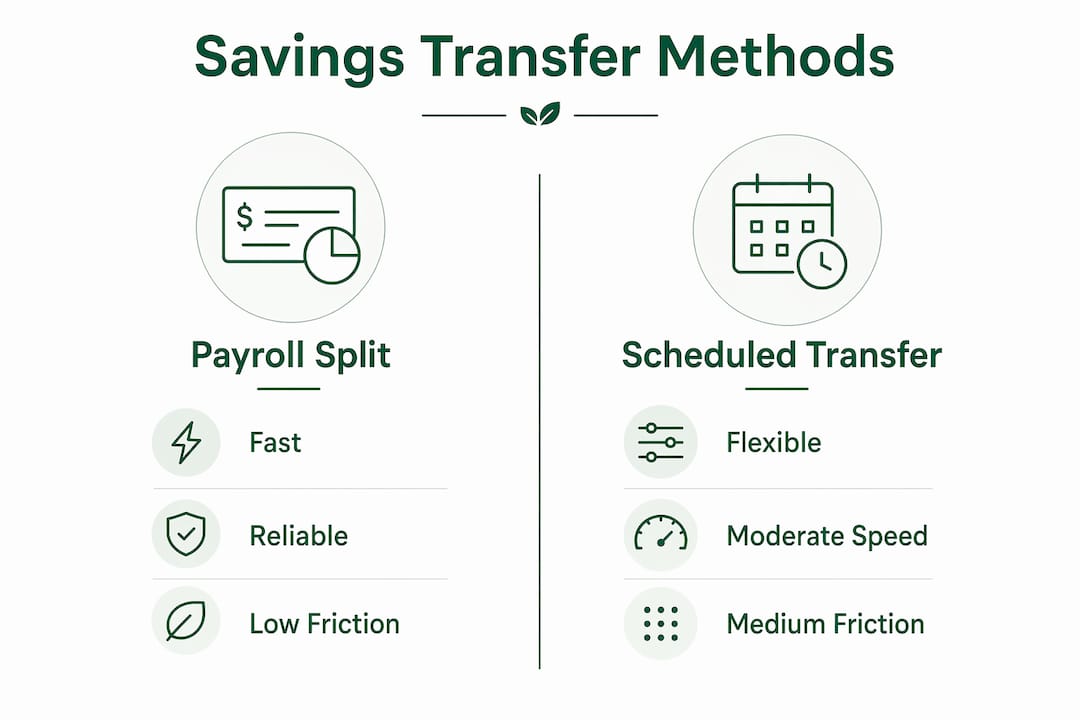
The payroll split wins on speed and reliability. The scheduled bank transfer is the most flexible option. Round-up programs work best as a supplement, not a primary savings method.
Key takeaways
Automatic savings transfers work because they remove the decision to save and replace it with a system that runs without your involvement.
| Point | Details |
|---|---|
| Start with direct deposit splits | Employer splits send money to savings before it reaches checking, making it the most reliable method. |
| Time transfers carefully | Schedule transfers 1–2 days after payday to avoid overdrafts from delayed paycheck processing. |
| Use separate banks | Keeping savings at a different bank adds a transfer delay that protects against impulsive withdrawals. |
| Small amounts add up | Saving $25 per paycheck produces over $600 annually without any manual effort. |
| Review your setup quarterly | Adjust transfer amounts as your income and expenses change to keep the system effective. |
Why automation changed how I think about saving
Most people treat saving as a discipline problem. They believe they would save more if they just had more willpower. That framing is wrong, and it keeps people stuck.
The real barrier is not willpower. It is the number of decisions you have to make. Every payday, a manual saver faces the same question: how much should I save this month? That question competes with rent, groceries, a car repair, and a dinner invitation. Willpower loses that competition more often than not.
Automation sidesteps the question entirely. The money moves before you decide anything. What I have seen, both personally and in the financial stories I follow closely, is that people who automate even a small amount consistently outperform people who save large amounts manually but inconsistently. Consistency beats size every time.
The one thing I would add to most automation advice is this: use a separate bank. Not because the math changes, but because the psychology does. When your savings account is three clicks away in the same app as your checking account, it does not feel like savings. It feels like a reserve fund you are allowed to tap. A different bank, with a 1–3 day transfer window, makes that money feel genuinely off-limits. That friction is not a bug. It is the feature.
Balance automation with awareness. Check your transfers monthly, even if you do not adjust them. Knowing your system is working builds confidence, and confidence builds better financial habits over time.
— Mika L.
Savingsgrove resources for smarter savings automation
Savingsgrove tracks the financial tools, bank features, and savings strategies that actually move the needle for everyday savers.
If you are setting up automatic transfers for the first time or looking to get more from the system you already have, Savingsgrove brings together monthly-updated guides on high-yield savings accounts, credit card rewards, and bank alert features in one place. The goal is to help you pair automation with the right accounts so your money works harder without extra effort. Visit Savingsgrove to find tools and resources that match where you are in your savings goals right now.
FAQ
What is the role of automatic savings transfers?
Automatic savings transfers move money from your checking account to savings on a set schedule, removing the need to decide to save manually. Their core role is to make saving consistent and effortless by turning it into a default behavior.
How do I avoid overdrafts with automatic transfers?
Schedule your transfer 1–2 days after your paycheck clears and activate low-balance alerts through your bank. These two steps catch timing issues before they result in overdraft fees.
How much should I set for my automatic transfer amount?
Start with a small, sustainable amount you will not miss, such as $25 per paycheck, and increase it gradually. Even $25 per paycheck produces over $600 in savings annually without any manual effort.
Is a direct deposit split better than a scheduled bank transfer?
Direct deposit splits are generally more effective because the money goes directly to savings before it reaches your checking account. Scheduled bank transfers are a strong alternative for anyone whose employer does not offer payroll splits.
Should I use the same bank for checking and savings?
Using a separate bank for savings is the better approach. The 1–3 business day transfer delay between banks creates friction that protects your savings from impulsive withdrawals.
0 comments
Leave a comment
Reviewed before they appear. Your email is not shown.