

The three highest-impact moves are calling your provider’s retention line, eliminating equipment rental fees, and checking federal or provider assistance programs. Together, they often lower your bill by a moderate amount each month, sometimes within a single phone call. Buy your own modem, check your Lifeline eligibility, and call before your promo rate expires.
TL;DR:
- Most households can save $10 to $40 monthly by calling their provider’s retention line with a competitor’s rate in hand before their promo expires.
- Qualifying for Lifeline allows some low-income households to receive up to $9.25 monthly discounts, with eligibility based on income or assistance program enrollment.
- Buying a personal modem and router typically costs less than renting, enabling permanent removal of equipment rental fees that often total up to $180 annually.
- Running a speed test during peak hours and comparing results to your plan tier can reveal if you’re paying for excess bandwidth, which can be downgraded to save money.
- Switching to 5G home internet or fiber where available can be cheaper and more straightforward than negotiation, provided your area supports these options and early termination fees are manageable.
Table of Contents
- How to Negotiate a Lower Internet Bill
- Do I Qualify for Lifeline or Other Internet Assistance?
- Stop Renting Equipment You Could Own
- Are You Paying for More Speed Than You Use?
- When Switching Providers Beats Negotiating
- Your Internet Billing Audit Checklist
- Your One-Week Action Plan
- Why Small Recurring Savings Beat One Big Cut
- Where Savings Grove Helps Next
- Where to Apply or Verify Benefits
- Sources
- FAQ
How to Negotiate a Lower Internet Bill
Retention teams exist because keeping you costs less than replacing you. Walking in prepared is what separates a $5 discount from a $40 one.
Start with research. Pull up your last bill and note your promo expiry date and your current total, including every fee. Then check the FCC’s broadband availability and data tools for new-customer promo rates at your exact address. That number is your leverage.
- Call and say “cancel service” or “disconnect.” This routes you past general support to the retention or cancellation desk, which typically has authority to approve deeper discounts than a standard agent.
- State your case plainly. Tell the rep how long you’ve been a customer, quote the competing price you found, and ask directly for a price match or a new promotional rate.
- Push for specifics. Ask whether the discount is permanent or temporary, whether any fees are waived, and get the new rate confirmed in writing or by email.
- Escalate if needed. If the first rep can’t help, politely ask for a supervisor or the loyalty department before you hang up.
Timing changes your odds. The best window is 30 to 60 days before your promo expires, since the provider knows your rate is about to jump and has an incentive to keep you before that happens, according to negotiation research from BroadbandNow. Many customers land savings of $10 to $40 a month using this exact approach. For more scripts you can adapt to other bills, Savings Grove’s guide on negotiating lower bills covers the same tactics for cable, phone, and streaming.
Pro Tip: Set a calendar reminder for the day your promo rate ends. Providers rarely warn you before the price doubles, and that “promo cliff” is the single most avoidable overpayment on your bill.
Do I Qualify for Lifeline or Other Internet Assistance?
Millions of households qualify for federal help and don’t know it; in fact, there has been a rekordni broj zahtjeva za apn kredite highlighting the demand for government loan assistance recently. Lifeline is the main ongoing federal discount, and it’s smaller than what many readers expect, but it’s real money every month.
- The FCC’s Lifeline program provides a standard discount of up to $9.25 a month for eligible low-income households, and up to $34.25 a month for residents on qualifying Tribal lands.
- Eligibility runs through income limits or enrollment in programs like SNAP or Medicaid; you apply and verify documents directly at Lifelinesupport.
- The Affordable Connectivity Program, which once offered a much larger $30 monthly benefit, ended in 2024 with no direct federal successor. Lifeline remains the primary ongoing federal discount.
- Many providers still run their own low-income internet plans separate from Lifeline, so ask specifically whether the two can stack.
- Call your provider’s customer service line and ask for their “low-income assistance program” by name. Front-line reps don’t always volunteer this.
For a broader rundown of programs beyond Lifeline, including community and provider-specific options, Savings Grove’s guide to free internet access walks through what’s still available in 2026.
Stop Renting Equipment You Could Own
That modem rental fee on your bill is one of the easiest charges to erase permanently, and most people never bother.
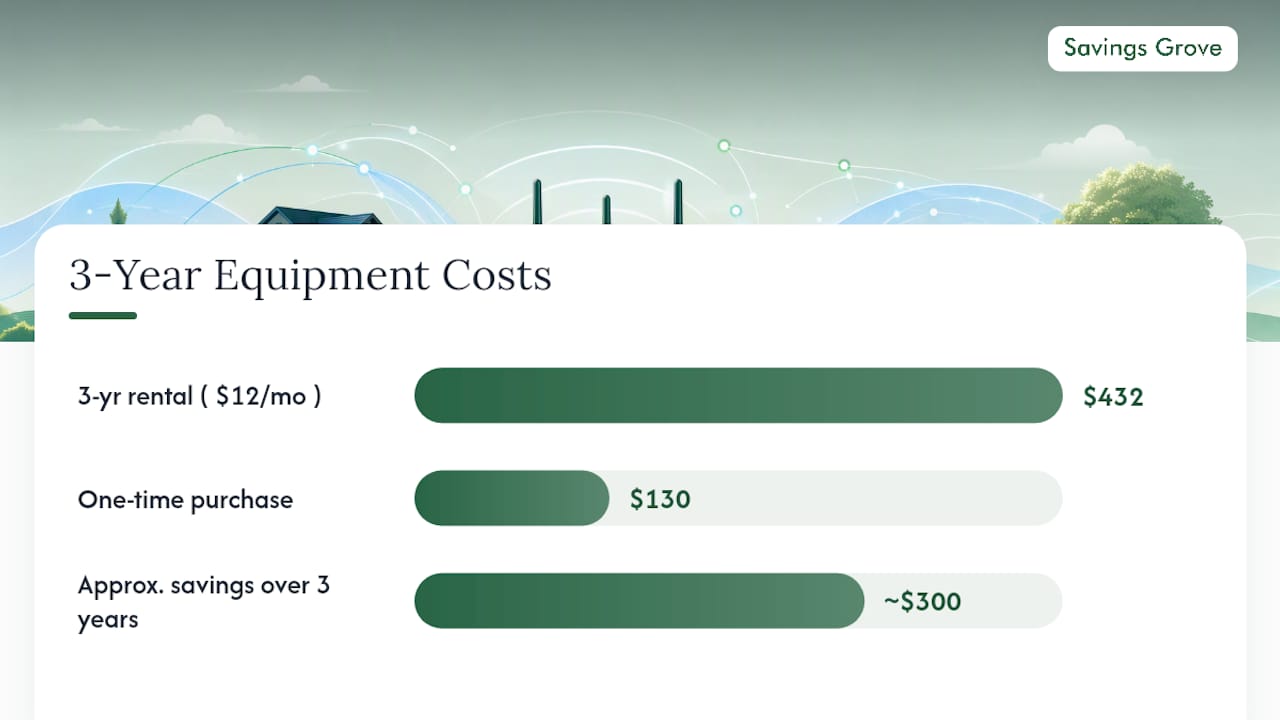
Rental fees typically run $10 to $15 a month, which adds up to $120 to $180 a year for a device you never own. Buying a compatible modem and router usually costs $100 to $150 and pays for itself in 8 to 12 months.
- Check your provider’s approved equipment list before buying, since not every modem works with every network.
- Buy the device, activate it using your provider’s app or a quick support call, then return the rented gear to stop the charge.
- While you’re in there, scan for other recurring line items like device insurance or add-ons you forgot you had.
- Ask specifically about autopay and paperless billing discounts. They’re often $5 to $10 off and rarely applied automatically.
Fast math: a $12 monthly rental fee costs $432 over three years. A one-time $130 purchase saves roughly $300 in that same window.
Are You Paying for More Speed Than You Use?
Most households pay for far more bandwidth than they touch. Finding out takes ten minutes and could shave a real chunk off your bill.
- Run a speed test during peak evening hours, ideally between 7 and 10 p.m. when your household is actually online, not at 9 a.m. when nothing else competes for bandwidth.
- Test with multiple devices active at once. Stream a show, run a video call, and let a phone update in the background, then check the result.
- Compare it to your plan tier. Most homes run comfortably on 100 to 300 Mbps, even with several people streaming and working from home simultaneously.
- Downgrade one tier if your usage falls well below your plan. That single step often saves $10 to $20 a month with no noticeable difference in daily use.
Skip the downgrade if your household includes heavy competitive gaming, multiple simultaneous 4K streams, or a home office running large file transfers. If you’re unsure, ask your provider about a temporary downgrade window before committing.
When Switching Providers Beats Negotiating
Sometimes the better move isn’t a phone call. It’s a different connection entirely.
- 5G home internet typically runs $40 to $60 a month with no equipment rental and setup you can handle yourself. Performance depends heavily on your specific address, so check coverage before committing.
- Fiber and regional providers, where available, often price competitively and skip the promo-rate trap altogether since many run flat pricing with no first-year discount that later disappears.
- Mobile hotspot plans and MVNOs work well as a temporary or secondary connection while you’re between leases or waiting on a fiber install, though they rarely replace a full home connection long term.
Before switching anything, check your current contract for early termination fees. A $200 penalty can wipe out a year of savings from a cheaper plan.
Your Internet Billing Audit Checklist
A one-time audit catches the mistakes that quietly cost you money every month, and a short annual routine keeps them from creeping back.
- Pull your last three bills and flag equipment rental charges, bundle add-ons, and any data overage fees.
- Confirm autopay and paperless discounts are applied. If they’re missing, call and ask for the credit to be backdated.
- Document the call. Note the date, rep name, and confirmation number for any promised credit, and expect it to post within one to two billing cycles.
- Set a recurring annual reminder to review your rate, ideally timed just before your current promo expires.
Pro Tip: Save every confirmation email and screenshot from a retention call. If a promised credit doesn’t appear on your next bill, you’ll need that proof to get it fixed fast.
Your One-Week Action Plan
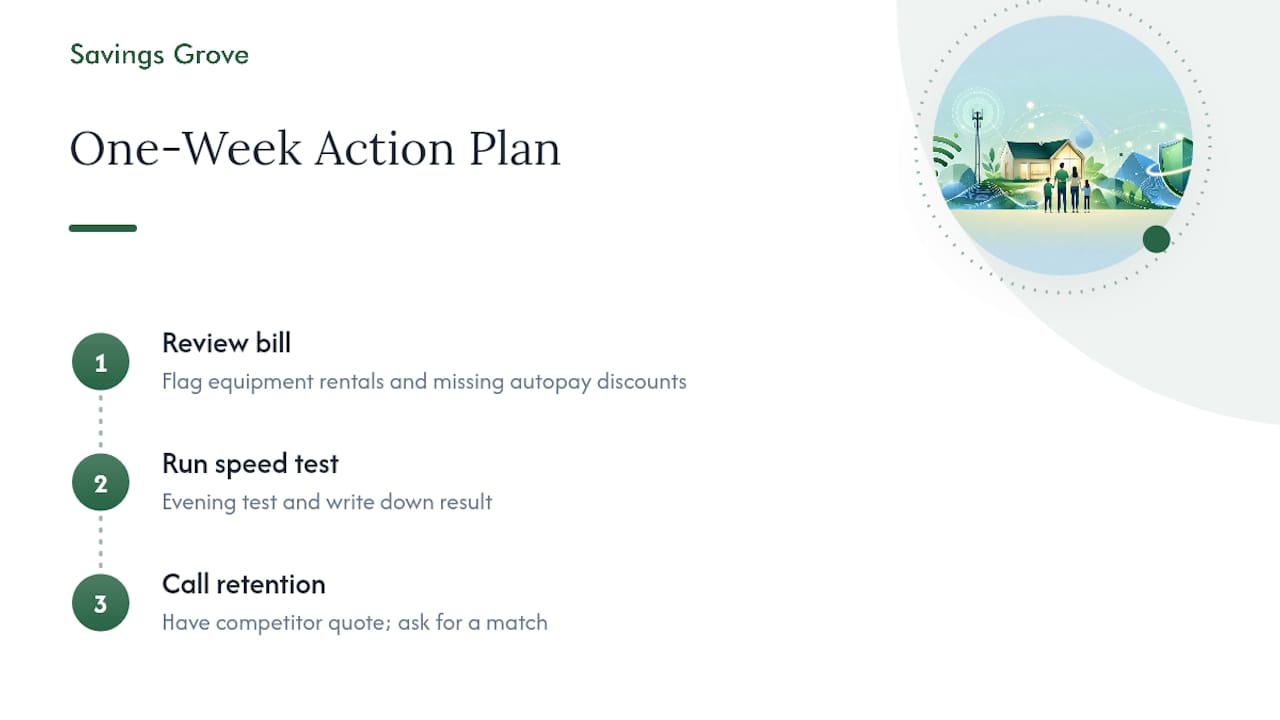
Here’s what to actually do this week, in order. First, pull your bill and flag any equipment rental fees or missing autopay discounts. Second, run an evening speed test and write down the result. Third, call retention with a competitor quote in hand and ask for a match. The checklist reflects a current review of programs and figures relevant to consumers. Come back for updated scripts as providers change their offers.
Why Small Recurring Savings Beat One Big Cut
Cutting $30 off one bill feels good for a month and then gets forgotten. Reviewing your rate every year, the way new deals are tracked monthly, is what actually compounds. Put a reminder on your calendar today, not just this call.
— Mika L.
Where Savings Grove Helps Next
Savings Grove is the alternative to guessing your way through a retention call. We build the negotiation scripts, the equipment payback math, and the assistance-program checklists so you walk into that call already holding the leverage a rep expects only seasoned customers to have.
If you cut your bill using the equipment and negotiation tactics above, the same playbook applies to your other recurring costs. Savings Grove’s guide to cutting household expenses fast and its subscription savings tactics both use the same call-and-verify approach that just worked on your internet bill. Head to Savingsgrove for the full library of scripts and updated provider offers, and start with whichever bill is costing you the most right now.
Where to Apply or Verify Benefits
- FCC Lifeline program page: official details on discount amounts and eligibility rules.
- Lifelinesupport: apply and confirm your eligibility documents.
- Usa: overview of federal help options.
This article is general information, not a substitute for advice from a qualified financial advisor. Consult a qualified financial professional about your own circumstances before acting on anything here.
Sources
FAQ
How Do I Get My Internet Bill Lowered?
Call your provider’s retention department, mention a specific competitor rate for your address, and ask for a price match or new promotional discount. Most customers who do this save $10 to $40 a month, especially when calling 30 to 60 days before their current promo expires.
Is $100 a Month Too Much for Internet?
It depends on your speed tier and area, but many households can get comparable service for less through negotiation, equipment ownership, or a provider switch. If you’re paying $100 or more without a recent rate check, you’re likely covering equipment rental fees or a promo rate that already expired.
What Provider Has the Worst Wi-Fi?
Performance varies too much by address and network congestion to name one provider as universally worst. Check the FCC’s broadband data tools for performance and availability specific to your exact location before choosing or switching providers.
Do People on Social Security Get Free Internet?
Social Security income alone doesn’t guarantee free internet, but many recipients qualify for the Lifeline discount of up to $9.25 a month through enrollment in programs like SNAP or Medicaid. Some providers also run separate low-income plans worth checking alongside Lifeline.
0 comments
Leave a comment
Reviewed before they appear. Your email is not shown.