

Budgeting apps are defined as digital tools that track income, categorize expenses, and help users build spending plans in real time. The role of budgeting apps for students goes beyond simple expense logging. These tools transform irregular, unpredictable student finances into a clear picture you can act on. Students juggle financial aid disbursements, part-time job paychecks, and fluctuating costs like textbooks and rent. Without a system, money disappears fast. The right app gives you visibility, structure, and the habit of thinking before you spend, which is a skill that pays off long after graduation.
How do budgeting apps handle student-specific financial realities?
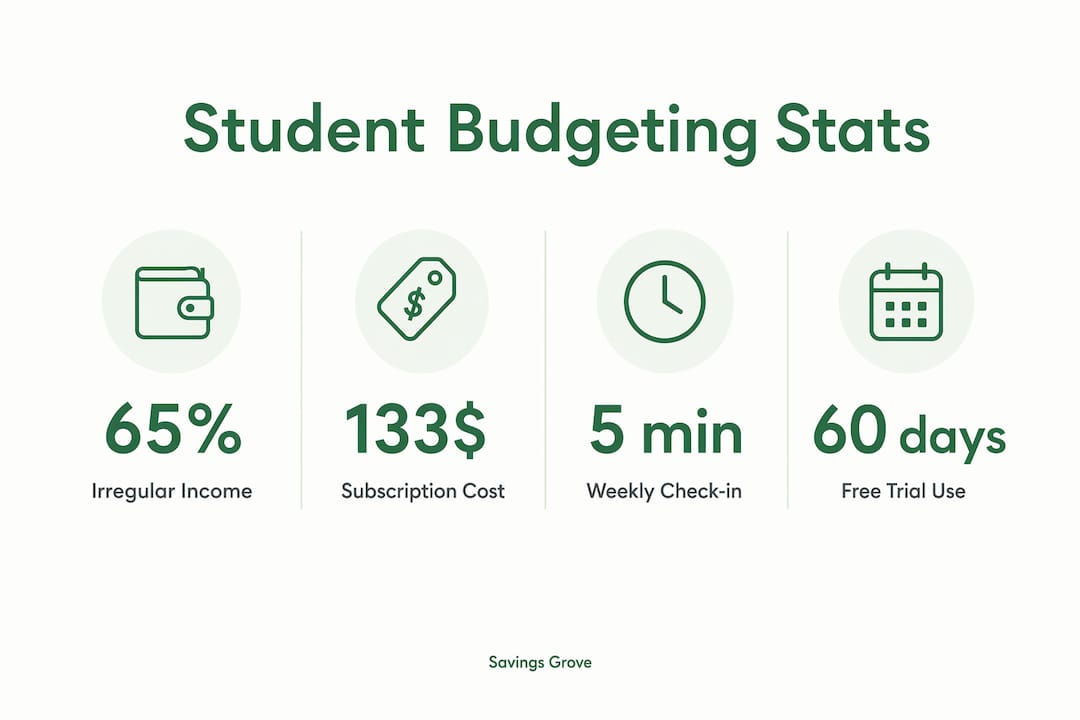
Student finances do not follow a predictable monthly pattern, and most budgeting tools built for working adults assume they do. Many apps designed for steady paychecks fail students with variable income streams like financial aid refunds, freelance gigs, and irregular part-time hours. That mismatch is one of the biggest reasons students abandon budgeting altogether.
The best financial management apps for students solve this with flexible budgeting frameworks. Zero-based budgeting is one of the most effective methods for students. It requires you to assign every dollar a job before the month begins. Zero-based budgeting helps students save an average of $600 in the first two months by flipping the “spend first, save what’s left” habit into deliberate planning.

Envelope budgeting is another method that maps well to student life. You divide your available money into virtual spending categories, like groceries, transportation, and entertainment, and stop spending in a category once it hits zero. This method works especially well when income arrives in large, infrequent chunks like a semester’s financial aid.
Student spending categories are often smaller and more variable than adult budgets, and standard 8–12 category templates rarely fit. Apps that let you create custom labels, like “dorm supplies” or “study snacks,” give you a more accurate picture of where money actually goes.
- Irregular income support: Look for apps that let you log income as it arrives rather than forcing a fixed monthly salary input.
- Buffer month feature: Some apps support “buffer months,” where you spend last month’s money instead of predicting this month’s income. This approach is especially useful during academic breaks.
- Custom categories: Rename or create spending buckets that reflect your actual life, not a generic adult budget.
- Weekly budgeting view: A weekly view often works better than monthly for students whose expenses spike around midterms or move-in periods.
Pro Tip: If your income arrives in large semester chunks, divide the total by the number of weeks in the semester and treat that weekly figure as your spending ceiling. Most apps let you set this manually even if they default to monthly views.
Manual vs. automated tracking: which approach builds better habits?
The choice between manual and automated budgeting is one of the most consequential decisions you will make when picking a budgeting tool for college. Both approaches work, but they build different skills and carry different risks.
Automated bank syncing pulls your transactions directly from your checking or credit accounts. The convenience is real. You open the app and your spending is already categorized. The downside is that automated tracking reduces friction but risks detaching you from the spending decision awareness you need most when you are new to managing money independently.
Manual entry budgeting promotes spending awareness better than automation for students new to financial independence. When you type in every purchase, you pause and register what you spent. That small act of conscious logging builds the mindfulness that makes budgeting stick.
Privacy is another reason many students prefer manual apps. Students often prefer apps without bank account linking because they want to protect their credentials and because many do not yet have traditional banking relationships. Manual entry apps give you full budgeting capability without handing over account access.
A hybrid approach works well for students who want both convenience and awareness:
- Start with manual entry for the first 30 days. This builds your baseline understanding of where money goes before automation fills in the gaps.
- Add read-only bank syncing after the habit forms. Read-only access lets the app pull transactions without allowing any transfers or account changes.
- Review every synced transaction before accepting it. Treat each auto-imported entry as a prompt to reflect, not just a data point to dismiss.
- Keep sensitive accounts manual. If you have a savings account or a student loan account, log those manually to stay aware of balances without exposing credentials.
Pro Tip: Set a five-minute “money check-in” every Sunday evening. Open your app, review the week’s spending, and adjust the coming week’s plan. This single habit does more for your financial health than any premium app feature.
What do budgeting apps actually cost for students?
Cost is a real barrier when your budget is already tight. The good news is that the advantages of budgeting apps are fully accessible without spending a dollar, if you know where to look.
Most standard budgeting apps charge $6–$15 per month. Over a year, that adds up to $72–$180, which is real money for a student. Student-specific pricing removes this barrier entirely for those who qualify.
- Free tiers: Many apps offer permanent free plans that cover basic tracking, category management, and spending reports. These plans meet the baseline needs of most students.
- Student verification programs: Some premium apps offer free access for up to 12 months with a valid student email. YNAB’s 12-month free student program saves $109 annually, making a premium zero-based budgeting tool fully accessible.
- Multi-currency free options: Students studying abroad or managing international transfers benefit from apps with free multi-currency support.
- Trial before upgrade: Starting free builds the habit first. Transitioning directly to paid apps without habit formation leads to high abandonment rates.
One cost students consistently overlook is their own subscription spending. Students underestimate recurring subscription expenses by over $133 per month on average. A budgeting app that surfaces these hidden charges can save you far more than it costs. Check out these subscription-saving strategies to cut costs before they compound.
Pro Tip: Before paying for any app upgrade, use the free version for at least 60 days. If you are still opening it consistently after two months, the upgrade is worth it. If not, the free tier is doing its job.
Best practices for choosing and sticking with a budgeting app
The best budgeting app for you is the one you will actually use. The right app aligns with your personal habits, privacy comfort, and financial complexity rather than the one with the longest feature list.
Consistency matters more than capability. Using one budgeting app for 30 or more days is a leading success factor. Switching apps frequently breaks your data history and resets the habit-building process. Commit to one tool long enough to see a real pattern in your spending before deciding it is not working.
Here is a practical framework for selecting and using a student budgeting app:
- Match the app to your income type. If your income is irregular, choose an app that supports manual income logging and flexible budget periods rather than strict monthly resets.
- Prioritize subscription tracking. Any app you choose should make it easy to see recurring charges at a glance. Hidden subscriptions are one of the fastest ways student budgets fall apart.
- Avoid app-hopping. Switching tools every few weeks destroys data continuity. Give any app at least 30 days before evaluating whether it fits.
- Use shared expense features if you have roommates. Some apps let you split costs or track shared bills, which reduces the friction of managing group living expenses.
- Customize your categories immediately. Rename default categories to reflect your actual spending on day one. This makes the app feel personal and increases the likelihood you will keep using it.
For a broader look at money habits for college, Savings Grove has a dedicated guide covering the most common financial mistakes students make and how to avoid them.
Building budgeting discipline during college through consistent app use significantly improves post-graduation financial health. The habits you form now compound over time in the same way interest does.
| Habit | Why it matters |
|---|---|
| One app for 30+ days | Builds data history and reinforces the tracking habit |
| Weekly spending reviews | Catches overspending before it becomes a crisis |
| Custom category labels | Makes your budget reflect real life, not a template |
| Subscription audits monthly | Surfaces hidden charges that drain limited budgets |
| Free tier before upgrading | Confirms habit formation before adding a cost |
Key Takeaways
Budgeting apps give students the structure to manage irregular income, track hidden costs, and build financial habits that last well beyond college.
| Point | Details |
|---|---|
| Apps fit student income patterns | Choose tools that support irregular income and flexible budget periods, not fixed monthly salary inputs. |
| Manual entry builds awareness | Logging purchases manually creates spending mindfulness that automation alone cannot replicate. |
| Free tiers cover most needs | Start with free or student-verified plans before committing to a paid subscription. |
| Subscriptions are a hidden drain | Students underestimate recurring charges by over $133 monthly; an app that surfaces these saves real money. |
| Consistency beats features | Using one app for 30 or more days matters more than picking the app with the most features. |
Why I think most students pick the wrong app for the wrong reasons
Students tend to choose budgeting apps based on aesthetics or social media recommendations rather than fit. I have watched this pattern repeat constantly. Someone downloads a visually polished app, spends a weekend setting it up, and abandons it by week three because it was built for a salaried professional, not a student with three different income sources and a meal plan to account for.
The uncomfortable truth is that the learning curve is the point. The friction of manually logging a $4 coffee is not a flaw. It is the mechanism that makes you think twice before buying the next one. Students who skip straight to automated syncing often feel like they are budgeting without actually changing their behavior. The numbers update, but the habits do not.
My strongest advice is to resist the urge to find the “perfect” app before you start. Pick a free, simple tool, use it every day for a month, and pay attention to what feels missing. That gap will tell you exactly what features you actually need. Patience during that first month is the real skill. The app is just the tool.
The long-term payoff is significant. Students who build consistent budgeting habits in college carry those skills into their first jobs, their first apartments, and eventually their first major financial decisions. No app does that for you. But the right app, used consistently, makes it far easier to get there. For a deeper look at proven budgeting strategies that produce real results, the numbers speak for themselves.
— Mika L.
Savings Grove resources for student budgeting
Managing money as a student is genuinely hard, and the right resources make a measurable difference.
Savings Grove publishes monthly-updated guides built specifically for students navigating tight budgets, irregular income, and the financial decisions that follow graduation. From curated lists of free budgeting apps to step-by-step breakdowns of student discounts and credit card rewards, every resource is fact-checked and practical. If you are ready to stop guessing where your money goes and start building a plan that actually fits your life, Savings Grove is the place to start.
FAQ
What is the main role of budgeting apps for students?
Budgeting apps help students track income and expenses, manage irregular cash flow, and build consistent financial habits during a critical period of financial independence.
Are free budgeting apps good enough for college students?
Free tiers cover the baseline needs of most students, including expense tracking, category management, and spending reports. Upgrading only makes sense after a consistent habit is already formed.
Should students use manual or automated budgeting apps?
Manual entry builds stronger spending awareness for students new to managing money. A hybrid approach, starting manual and adding read-only bank syncing later, balances mindfulness with convenience.
How do budgeting apps help students with subscription costs?
Students underestimate recurring subscription expenses by over $133 monthly on average. Budgeting apps that surface recurring charges make it easy to identify and cancel services you no longer use.
How long does it take for a budgeting app to make a difference?
Financial counselors recommend using one app consistently for at least 30 days before evaluating results. Switching apps before that point resets your data and disrupts habit formation.
0 comments
Leave a comment
Reviewed before they appear. Your email is not shown.